Thursday, May 24, 2012

Your personal invitation to join the BGAMUG Blog and the BGAMUG Facebook page.

THIS IS YOUR PERSONAL INVITATION TO JOIN THE BGAMUG BLOG - AND FACEBOOK PAGE.

I am going to send an invitation out to join this blog, and to join our Facebook group for anyone in the club who wants to join. I will put it in an email (if I already know you pretty well in the BGAMUG Computer Club) or in the newsletter (for people I want to get to know soon!)

But for now, you can join by following the instructions here.

You can join by subscribing by email or in a reader. These choices are at the left here on the blog site. Here is what they look like: (except for the tools symbol at the right of each; these are my symbols for being in "edit" mode).

This is a screen shot of the section you want to find.


If you are subscribed to Google, you can also join with Google Friend Connect. Scroll down a bit further, and you will see the button to use for this.


 When you are connected, it's more easy to find other blogs you like, make friends with other readers, get computer tips and ideas, and get the blog postings and/or Facebook news delivered right to you in your email inbox. You can adjust when you get your messages in your privacy or account settings too.

AND TO LINK UP TO FACEBOOK:

#1: Get a Facebook account (easy - - just go to Facebook.com and sign up...)
#2. Edit your privacy settings (pretty easy - - go to your Privacy Settings area)

This is what mine looks like:


Just scroll down with the arrow by "home" to fix the Privacy settings for yourself.

#3. Be a Friend of the BGAMUG Facebook group. (After you sign up...) You just hit the "Like" button for this. Here is an example of a page you can "Like" (I am not a member, but to "Like" the BGAMUG Facebook group, you can now see where the "Like" button is - it's at the right side of your screen, underneath your name.)


 See you soon - all over, I hope!

Questions? Just call me (members) or email me (anyone) and I will step you through it. I would love to have more online members of both sites.


Betsy S.
Webmaster and Moderator
The BGAMUG Blog
BGAMUG on Facebook (the BGAMUG Facebook Group)
The BGAMUG website - for the BGAMUG Computer Club, Bowling Green, KY.

PPS It is perfectly OK for fans or prior members to sign up too, or computer users from anywhere.

Tuesday, May 22, 2012

Our BGAMUG Membership meeting for May 2012

Hi, all!

I liked our meeting. We had a few of our officers there, and had some new visitors too.

Jeri told us about her favorite apps for her iPod. I can't wait to check them out. I think there will be more than a few members who will decide they want to try out an iPhone or iPad this year. Many of the apps can be used on an iPod and iPhone too, plus your computer, I found out.

I took lots of notes, and plan to try out some of the apps for myself soon.

I enjoyed the Geneology SIG (Special Interest Group) too. My next step for this group will be to make a couple of Research Folders so I can be better organized while looking up names.

Our next meeting will be on June 26th. Joe E. will be talking about voice commands for computers. Sounds interesting!

Thanks for a wonderful meeting, Jeri.

We missed everyone who could not make it. See you next time!

Betsy S.
Webmaster, 2012
The BGAMUG Computer Club
Our website
Our Facebook page

Saturday, May 19, 2012

In praise of backups! And when the BGAMUG News will be posted online.

Hi, fellow computer users plus BGAMUG friends and members.

The newest BGAMUG News is out. I would direct you to the web page, but I need to redo my website connection which I will do next week.

I have been replacing programs all week and then some. And some I had to completely replace.

So don't worry... if you are a member, you have your newsletter via email. And I will post the latest newsletter online at the website asap, as soon as everything is back in order.

Thank goodness for backups. I have been able to do most everything, with one exception. Corel Draw, one of my favorite programs, is no longer available for Mac, unless you put another program on your computer that runs Windows. I am not sure I want to do that or not.

So... I am using Illustrator for now. All the buttons are in different places. Ack! But it is a good program and I already have it.

So... be looking for your May newsletter, BGAMUG members and fans, on the site or with a link sometime next week. I hope you have a great week on your computer.

E. Sheppard Webmaster, 2012 The BGAMUG Computer Club.

Saturday, May 12, 2012

Checking in - my new iPad, and changing technology

Hi, all!

I am writing this short posting on my iPad. It replaces a notebook computer that I used to use at the Pots Place downtown when I was there.

Today is Second Saturday and I am trying this new iPad out. I added a keyboard from RocketFish that uses the iPad inside of it, so I can use a regular typewriter keyboard on it. This saves me a LOT of time, since my tapping skills aren't as good as my TYPING skills.

One thing I have noticed is that I need to insert the paragraph symbol or all my type mixes up together. When I do my Blogger blog on my regular computer, I have a choice of whether or not to use html.

I will have to find out how to insert photos here next.

But it's fun to be able to do a posting on the fly.

I have a feeling using an iPhone will be different too. There is always a learning curve!

Betsyanne BGAMUG Webmaster, 2012

PS See you at the next BGAMUG meeting, Tuesday, May 22nd, at 6:30. Find out more at the BGAMUG site here:

http://www.bgamug.org/

Thursday, May 10, 2012

Like the BGAMUG Computer Club Facebook page

You are invited to join the BGAMUG Computer Club on Facebook. 


Like The BGAMUG Computer Club Facebook Page. to receive fun computer cartoons, notices of club meetings, reviews, neat computer links and tips, information about new gadgets for your computer, and more.

Just go here and Like this Facebook page: The BGAMUG Computer Club Facebook Page. There are 43 members right now. Become #44.


And while you are at it, become a member of this blog by clicking the  "Join this site" button right under the BGAMUG logo here on the left side. 

See you here - and there!

Betsyanne
BGAMUG Webmaster, 2012
Our web page

Monday, April 30, 2012

Genealogy and the BGAMUG Computer Club

The original of this photo is from jczart on Flickr.

We have a great Genealogy group (SIG) at the BGAMUG Computer Club. The Genealogy SIG (Special Interest Group) meets an hour before the regular meeting at 5:30.

We discuss all things Genealogy. Our club leader, Jeri, is a long-time genealogist who does professional work.

If you want to learn how to start in Genealogy, or how to use the many new resources online, it's a great group to join.

Just saying! I have already learned a lot and am making a Genealogy Lesson folder. And hey, the price is certainly right.

Our next Genealogy SIG meeting is at 5:30 on Tuesday, May 22nd, at Building F of the Bowling Green Technical College.

Guests are welcome.

Later,
E. Sheppard
Webmaster, 2012
The BGAMUG Computer Club
Our Facebook page

Wednesday, April 25, 2012

Helping your family when you are gone - your will, etc.

Be Ready - the BGAMUG Computer Club Presentation Roundup from last night's meeting.
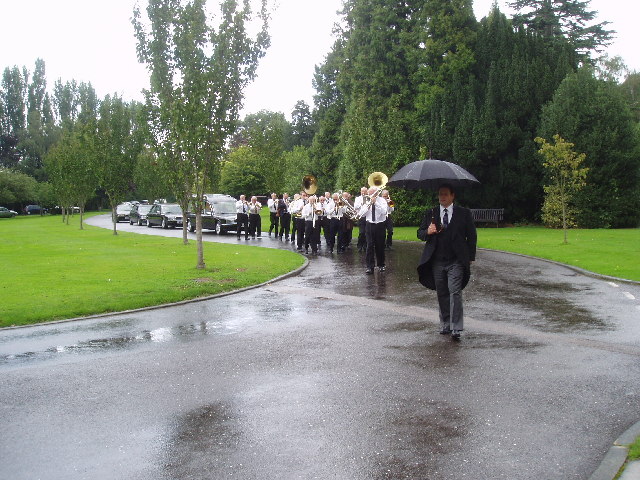
Jazz Funeral, Leatherhead Crematorium, Surrey by Dr Neil Clifton

I really liked this presentation. I generally learn something from each one, but this presentation was more timely than many. Ray even played a Goodbye presentation slideshow with music that he made and said he would help any member who wants to make one for themselves, to play for their loved ones.

The main point of the presentation was to be ready - - to be prepared for your own death, so as to make it easier for  your family. Also, one member brought up, you can plan ahead so things are done as you wish. If you want a certain casket, for instance, you can pick one out ahead of time.

Last wishes - your preferred service, what you want to say to your loved ones, who you want to get what when you are gone, etc., etc. - - these are all things we seldom talk about.

Ray gave everyone there a CD with all kinds of useful forms to fill out. A will form was included, as well as a Living Will form. Ray and other members said that a form could be filled out, then it could be signed by the two required witnesses, and notarized. This form could then be checked out by a lawyer (which I will be doing).

One member mentioned a lost will - - it was not where the person said it would be, in a lock box. Another person said that a will had an Executor AND a back-up Executor, but both died before the person in the will. Both of these things made things harder for the families, I expect.

You are saving time and money, plus aggravation on the part of the families to make sure everything is done and put in a safe place, and people notified of where you are keeping this information. And no matter what age you are, putting this off can really backfire if something happens to you, and you are not ready with the forms and planning you need to do NOW.

New technology makes it much easier to leave a video/digital message for your family too, using slides and music with meaning for you.  Plus this will be a great memorial for your family to have of you. I like this idea.

Thanks, Ray. This (a new will and now a video/digital message for my family) is also on my list now. The forms you gave will really help too.

Being prepared - a Scout motto, but very apros pos. I plan to get these things done in the next couple of months.

Later!
Betsyanne
Webmaster, 2012
The BGAMUG Computer Club


Related Posts Plugin for WordPress, Blogger...