I went to the APCUG website today just to check it out.
They have articles on their main page, and interesting facts and programs they talk about too.
Here is that website:
http://apcug.net/index.html
You will need to cut and paste this link, because I have not figured out how to "select" just one line yet on my iPad.
I like all the things they are doing, and glad we are a member here.
Do you have a website or computer tip you would like to share? Leave it as a comment here. Thanks!
Betsy S.
Webmaster, BGAMUG, 2012
The BGAMUG Computer Club
http://bgamug.com/
PS You can read about the next meeting's presentation AND about the BGAMUG Computer Club's Christmas Party coming up here:
http://bgamugbg.blogspot.com/2012/11/get-those-white-elephant-gifts-ready.html.
Wednesday, November 14, 2012

Tuesday, November 6, 2012
Get those White Elephant Gifts ready! Plus, about our next meeting...
Just a reminder: the next BGAMUG meeting is on November 27th.
And the BGAMUG Christmas Party is coming up.
These notices are from the latest BGAMUG News, which you can download here.
Members, you can start wrapping up those White Elephant gifts now to have them ready by the party date. You can bring 1 gift or 5 and more if you wish.
Later!
-Betsy
E. Sheppard
Webmaster, 2012
The BGAMUG Computer Club.
Also: Join us on Facebook!
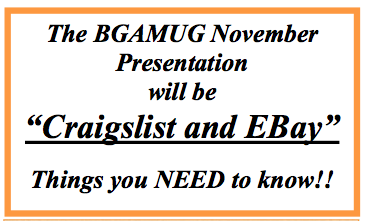 |
| This presentation on Craigslist and Ebay should be fun. |
And the BGAMUG Christmas Party is coming up.
 |
| Contact Paula if you can help with the party. |
These notices are from the latest BGAMUG News, which you can download here.
Members, you can start wrapping up those White Elephant gifts now to have them ready by the party date. You can bring 1 gift or 5 and more if you wish.
Later!
-Betsy
E. Sheppard
Webmaster, 2012
The BGAMUG Computer Club.
Also: Join us on Facebook!
Monday, October 29, 2012
Thursday, October 25, 2012
Thanks for the neat links, Jerry, and Jeri!
The meeting this week went well. We talked about the Christmas Party, and found out some things about the CCleaner free app that cleans Windows computers.
Here is something that our VP sent via email today.
APCUG, which the BGAMUG Computer Club belongs to, has a YouTube Channel!
You can go there and see some great videos.
Here is that link he sent via email: http://www.youtube.com/apcugvideos.
I went to this page today and looked at the titles. Our President, Jerry S., has a video about using Family Search.org for Genealogy Research here.
There are videos about digital photos, conferences, user group meetings as a vendor, Linux, Virtual Tech Conferences, and How to Register for an APCUG Virtual Conference.
Neat! I look forward to trying these.
Here is Jeri's presentation video and her slides:
Also, Jeri would like to post this link from MakeUseOf here on the blog today:
Getting a New Computer or Reinstalling Windows - Make a List of your License Keys.
Later!
-Betsy
E. Sheppard
Webmaster, 2012
The BGAMUG Computer Club.
Also: Join us on Facebook!
PS If you are a member, send a link to this blog to other members and suggest they join up so they can get this blog too.
Thanks!
Here is something that our VP sent via email today.
APCUG, which the BGAMUG Computer Club belongs to, has a YouTube Channel!
You can go there and see some great videos.
Here is that link he sent via email: http://www.youtube.com/apcugvideos.
I went to this page today and looked at the titles. Our President, Jerry S., has a video about using Family Search.org for Genealogy Research here.
There are videos about digital photos, conferences, user group meetings as a vendor, Linux, Virtual Tech Conferences, and How to Register for an APCUG Virtual Conference.
Neat! I look forward to trying these.
Here is Jeri's presentation video and her slides:
Also, Jeri would like to post this link from MakeUseOf here on the blog today:
Getting a New Computer or Reinstalling Windows - Make a List of your License Keys.
Later!
-Betsy
E. Sheppard
Webmaster, 2012
The BGAMUG Computer Club.
Also: Join us on Facebook!
PS If you are a member, send a link to this blog to other members and suggest they join up so they can get this blog too.
Thanks!
Sunday, October 21, 2012
A quick reminder... our next meeting is this Tuesday, October 23rd.
A quick reminder...

Our next BGAMUG meeting is this Tuesday at 6:30. A pre-meeting Genealogy Interest Group meeting will also happen at 5:45.
Do you live in the Bowling Green, Kentucky area? Come and visit.
To see a map to the meeting, just visit the Bowling Green BGAMUG Computer Club website and scroll down.
E. Sheppard
Webmaster, 2012
The BGAMUG Computer Club.
Also: Join us on Facebook!
Our next BGAMUG meeting is this Tuesday at 6:30. A pre-meeting Genealogy Interest Group meeting will also happen at 5:45.
Do you live in the Bowling Green, Kentucky area? Come and visit.
To see a map to the meeting, just visit the Bowling Green BGAMUG Computer Club website and scroll down.
E. Sheppard
Webmaster, 2012
The BGAMUG Computer Club.
Also: Join us on Facebook!
Thursday, October 18, 2012
Our October 2012 Newsletter is on the site, more.
Attention everyone!
The October 2012 Newsletter is now online. You can download it here:
The BGAMUG Newsletter Archive Page.
I think you will like it. It is a PDF file.
There are articles in it this month about the upcoming Christmas party, new iPhones and Androids (Jeri is going to talk about apps for these and how to use them soon), what to do if your phone is getting slow, and what to do before calling support.
Other articles include Wi-Fi on the Road, our Kroger Report, an Election Update, and when the Christmas Party is this year, including rules for the White Elephant Gift Exchange.
There is space on the newsletter to advertise you or your business too, just check out the ads already there and see Page 8 for Rates.
Visitors to our next meeting, there is a map there to help you find our location.
Board members, I just noticed that the next month's Board meeting will NOT be in person, but will instead be either cancelled OR an electronic one.
See you at our October meeting, which is on October 23rd (next Tuesday).
Thanks for all your hard work again, Sharon! She's our Newsletter Editor.
Later,
Betsy S.
Webmaster 2012
 |
| New Orleans Newsboys - by Lewis Wickes Hine at the Wikimedia.org site. |
The October 2012 Newsletter is now online. You can download it here:
The BGAMUG Newsletter Archive Page.
I think you will like it. It is a PDF file.
There are articles in it this month about the upcoming Christmas party, new iPhones and Androids (Jeri is going to talk about apps for these and how to use them soon), what to do if your phone is getting slow, and what to do before calling support.
Other articles include Wi-Fi on the Road, our Kroger Report, an Election Update, and when the Christmas Party is this year, including rules for the White Elephant Gift Exchange.
There is space on the newsletter to advertise you or your business too, just check out the ads already there and see Page 8 for Rates.
Visitors to our next meeting, there is a map there to help you find our location.
Board members, I just noticed that the next month's Board meeting will NOT be in person, but will instead be either cancelled OR an electronic one.
See you at our October meeting, which is on October 23rd (next Tuesday).
Thanks for all your hard work again, Sharon! She's our Newsletter Editor.
Later,
Betsy S.
Webmaster 2012
Friday, October 12, 2012
Be a Blogger! Here is Step One - and Two.
Have you ever wanted to be a blogger?
There are some pretty successful bloggers out there. Have you dreamed of making money or having a huge readership?
Or maybe you just want a personal blog - - maybe even with your photos added.
It's easier than you think.
Maybe you keep a diary at home. Having a blog can be just as easy. Updating can be once a week, or even more often.
It's fun to post photos there, during or even after a vacation.
You can join the free Blogger service or get your own web page and put a Wordpress blog on it.
It's fun! And not too hard either.
BGAMUG Club members, if you would like to have a blog, just call me and I'll help you out with advice.
I can also just be here at the end of a phone if you are a do-it-yourselfer and you have a question.
Have a great week!
B. Sheppard
Webmaster, 2012
The BGAMUG Computer Club
Bowling Green, Kentucky
PS When you get a blog, you can "advertise" it for free by Pinging it at Pingler and Feedburner. Feedburner has lots of tools you can use to get signups for your blog too. It's fun to learn what you can add to your blog too.
PPS Then you can go to Google Webmaster Tools to make your blog even better.

BGAMUG Computer Club members, do you have a favorite hobby online or something you would like to write about? Just let me know and I will put you on this blog as a contributor. Thanks!
And here is our website (a map to the meeting is there) - plus our Facebook page. See you there!
 |
| Photo credit: woodleywonderworks on Flickr. |
There are some pretty successful bloggers out there. Have you dreamed of making money or having a huge readership?
Or maybe you just want a personal blog - - maybe even with your photos added.
It's easier than you think.
Maybe you keep a diary at home. Having a blog can be just as easy. Updating can be once a week, or even more often.
It's fun to post photos there, during or even after a vacation.
You can join the free Blogger service or get your own web page and put a Wordpress blog on it.
It's fun! And not too hard either.
BGAMUG Club members, if you would like to have a blog, just call me and I'll help you out with advice.
I can also just be here at the end of a phone if you are a do-it-yourselfer and you have a question.
Have a great week!
B. Sheppard
Webmaster, 2012
The BGAMUG Computer Club
Bowling Green, Kentucky
PS When you get a blog, you can "advertise" it for free by Pinging it at Pingler and Feedburner. Feedburner has lots of tools you can use to get signups for your blog too. It's fun to learn what you can add to your blog too.
PPS Then you can go to Google Webmaster Tools to make your blog even better.

BGAMUG Computer Club members, do you have a favorite hobby online or something you would like to write about? Just let me know and I will put you on this blog as a contributor. Thanks!
And here is our website (a map to the meeting is there) - plus our Facebook page. See you there!
Subscribe to:
Posts (Atom)
